# 剪贴板 navigator.clipboard API 异步读写
> Web开发人员在实际工作中多少会遇到与用户剪贴板进行交互,以便实现用户体验需求。剪贴、复制、粘贴这几个操作也是计算机操作中常常会使用的几个功能按键。前端开发人员第一个想到的就是document.execCommand()方法,下面看看新的API方法,它的出现就是为了取代document.execCommand()方法。
Author: DeathGhost
Published: 2021-01-24 21:56:41
Category: javascript
Canonical: https://www.deathghost.cn/article/javascript/89
Keywords: JavaScript, 剪贴板, 复制, 剪贴, 粘贴, Clipboard, ClipboardEvent, read(), readText(), write()
一键复制或是快捷复制见到更多的应用场景可能就是一些数据信息管理系统,比如,一键复制用户信息、一键复制用户账号信息等,避免误操作导致后续工作出现问题。当然,若要与剪贴板进行交互,先得经过用户同意授权方可。
关于document.execCommand()上篇“[Angular CDK 工具包 Clipboard 剪贴板](https://www.deathghost.cn/article/angular/87)”有提及,这里也不再赘述,因为有人即将替代它了就不浪费精力在它身上了。
剪贴板 Clipboard API 提供了响应剪贴板命令(剪切、复制和粘贴)与异步读写系统剪贴板的能力。获取用户授权后,才能访问剪贴板内容;如果用户没有授予权限,则不允许读取或更改剪贴板内容。
比如拒绝返回:
// Uncaught (in promise) DOMException: Read permission denied.
剪贴板 navigator.clipboard API 异步读写系统剪贴板
## 访问剪贴板
navigator.clipboard.readText().then(
data => document.querySelector('div').innerText = data);
上述代码提取剪贴板内容,并将其填充在div元素内。
## 接口
Clipboard 提供了一个用于读写系统剪贴板上的文本和数据的接口。规范中被称为异步剪贴板 API,其拥有的方法:
read() 从剪贴板读取任意数据(比如图片),返回一个 Promise 对象。
readText() 从剪贴板读取文本数据。
write() 写入任意数据至操作系统剪贴板。
writeText() 写入文本至操作系统剪贴板。
ClipboardEvent 表示提供了有关剪贴板修改的信息的事件,也就是 cut、copy和 paste。规范中被称为剪贴板事件 API。
### 复制:将文本数据写入到剪贴板 writeText()
要将文本复制到剪贴板,则调用writeText()。由于此API是异步的,因此该writeText()函数将返回一个Promise,该Promise将根据传递的文本是否被成功复制来解决或拒绝。
copyPageUrl();
async function copyPageUrl() {
try {
await navigator.clipboard.writeText(location.href);
console.log('页面地址已被复制!');
} catch (err) {
console.error('复制失败: ', err);
}
}
### 复制:将任意数据写入到剪贴板 write()
write()方法用于将任意数据写入剪贴板,可以是文本数据,也可以是二进制数据,例如我们将图片写入剪贴板。
getClipboardImg();
async function getClipboardImg() {
try {
const imgURL = 'https://www.deathghost.cn/public/images/touch-icon-120.png';
const data = await fetch(imgURL);
const blob = await data.blob();
await navigator.clipboard.write([
new ClipboardItem({
[blob.type]: blob
})
]);
console.log('图片已被复制!');
} catch (err) {
console.error(err.name, err.message);
}
}
将会返回图片已被复制,我们可以尝试任意聊天软件(QQ、微信或钉钉),粘贴后即可。本示例测试于Chrome浏览器,但不支持JPG格式,仅支持PNG图片格式。否则返回报错:
NotAllowedError Type image/jpeg not supported on write.
// 或
NotAllowedError Type image/gif not supported on write.
// 或
NotAllowedError Type image/webp not supported on write.
要将图像写到剪贴板,需要将图像作为 blob。一种实现方法是使用fetch(),从服务器请求图像,然后调用 blob()响应。
### 粘贴:从剪贴板中读取文本数据 readText()
readText() 将从剪贴板中读取文本信息。如上述:
navigator.clipboard.readText().then(
data => document.querySelector('div').innerText = data);
### 粘贴:从剪贴板中读取任意数据 read()
read()方法也是异步,并返回Promise。要从剪贴板读取任意数据。
可以复制一张图片试试。
getClipboardContents();
async function getClipboardContents() {
try {
const clipboardItems = await navigator.clipboard.read();
for (const clipboardItem of clipboardItems) {
for (const type of clipboardItem.types) {
const blob = await clipboardItem.getType(type);
console.log(URL.createObjectURL(blob));
}
}
} catch (err) {
console.error(err.name, err.message);
}
}
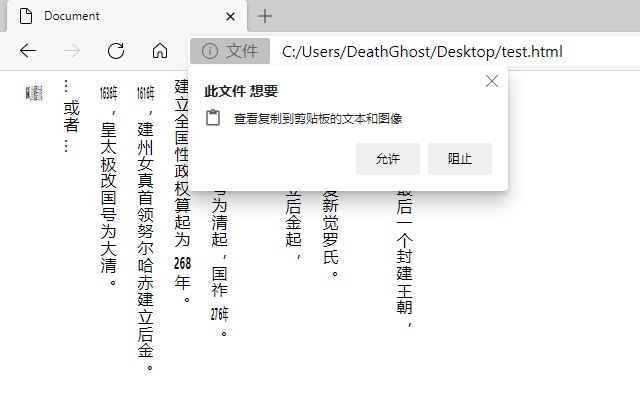
剪贴板 navigator.clipboard API 异步读写
### copy 事件监听
用户向剪贴板放入数据时,将触发copy事件。示例是将用户放入剪贴板的文本,转为小写。
用户DeathGhost尝试执行复制这段文本!
const p = document.querySelector('p');
p.addEventListener('copy', (event) => {
// console.log(event);
const selection = document.getSelection();
event.clipboardData.setData('text/plain', selection.toString().toLowerCase());
event.preventDefault();
});
### paste 事件监听
用户使用剪贴板数据,进行粘贴操作时,会触发paste事件。
const input = document.querySelector('#paste');
input.addEventListener('paste', async event => {
event.preventDefault();
const text = await navigator.clipboard.readText();
console.log('粘贴文本内容是: ', text);
});
### cut 事件监听
用户进行剪切操作时触发,处理方式跟copy事件一样。
const input = document.querySelector('#cut');
input.addEventListener('cut', async event => {
const text = await navigator.clipboard.readText();
console.log('被剪贴的内容是: ', text);
event.preventDefault();
});
所以,我们现在可以放弃document.execCommand()方法,拥抱新方法。浏览器支持可以参考CANIUSE。
## Related
- Previous: [String.prototype.replaceAll 替换字符串新方法](https://www.deathghost.cn/article/javascript/84)
- Next: [JS原生的深拷贝API structuredClone()](https://www.deathghost.cn/article/javascript/120)